











AI agents are getting better at reasoning, planning, and tool use. But as teams move from experiments to real deployments, a different bottleneck keeps showing up: interaction. It’s not enough for an agent to generate the right answer. In many systems, agents need to present choices, gather structured input, confirm actions, and guide users through decisions. When these interactions rely only on free-form text, teams quickly run into friction due to unclear next steps, inconsistent response formats, and interfaces that are hard to scale across products and channels.
This is why a new focus is emerging around agent-driven interfaces, systems where agents don’t just produce text, but help shape the UI that users interact with.
Projects like A2UI explore how agents can describe interface components declaratively so applications can render them as native UI, rather than raw text. At the same time, platforms such as the OpenAI Apps SDK are expanding how interactive app experiences can be embedded directly into conversational environments, blending tools, UI, and dialogue. These developments point to a broader architectural shift: the interface is becoming part of agent design. Instead of treating UI as a fixed layer around an AI system, teams are exploring ways for interaction to be more adaptive, contextual, and tightly connected to agent logic.
But this flexibility also raises important questions. How do you ensure agent-generated interfaces are predictable, safe, and consistent? How do you prevent ambiguous outputs from turning into confusing or risky user experiences? And how do you reuse interaction patterns across different use cases without redesigning everything from scratch?
This is where a third approach enters the picture: interaction contracts—structured templates and guardrails that define how agents present information and request input. Rather than letting every interaction be improvised, these contracts create a controlled bridge between agent reasoning and user-facing UI.
In this article, we’ll look at three distinct patterns for making AI agents UI-interactive:
- declarative, protocol-driven UI generation,
- embedded app-style interfaces inside agent hosts, and
- governed interaction contracts for structured agent responses.
Together, they outline how the Agent-UI interaction layer is evolving, and what teams should consider when designing AI agent interfaces that are not only intelligent but reliable.
The Interaction Gap: Why “Agent + Text” Often Breaks Down
Before looking at specific technologies or frameworks, it helps to understand the underlying challenge they’re responding to. As agents move closer to real user-facing experiences, the quality of interaction becomes a design problem, not just a model problem. Teams are discovering that without clearer interaction structures, even highly capable agents can feel unreliable or hard to use in practice.
What “Better Interactions” Actually Means
As agents move beyond simple Q&A and into operational use, interaction quality becomes just as important as model capability. The challenge is not only what the agent knows, but how that knowledge is presented and acted upon. In practice, teams designing agent systems quickly realize that effective interaction requires more than natural language alone. They need:
- Structured input, not just open-ended prompts — forms, selections, multi-step confirmations
- Clear affordances, so users know what actions are possible
- Incremental UI updates, where the interface adapts as the agent learns more
- Consistent response formats so that outputs can be rendered, reused, or audited
- Defined safety boundaries, so the interface cannot imply actions or states that the system hasn’t actually executed
These needs reflect a broader shift in how AI systems are being designed. Instead of treating interaction as a thin conversational layer, teams are recognizing that the interface itself is part of system architecture, closer to orchestration and control than simple presentation.
Common Failure Modes of Text-Only Agent Interaction
Text-based interaction is flexible, which makes it a powerful starting point. But when agents begin influencing workflows, decisions, or operations, several issues surface:
1. Free-Form Text Masquerading as Structure: Agents often return paragraphs that users must manually interpret as options, checklists, or decisions. This increases cognitive load and introduces inconsistency across similar interactions.
2. Implicit or Ambiguous Actions: An agent might say “Done” or “Updated”, but the UI doesn’t clearly indicate whether an action was simulated, recommended, or actually executed. This blurs the boundary between reasoning and system state.
3. Inconsistent Output Shapes: Without defined response structures, similar tasks produce different output formats. That makes UI rendering brittle and downstream automation difficult.
4. Interaction That Doesn’t Scale Across Surfaces: An interaction pattern designed for one chat interface may not translate cleanly to web portals, internal tools, or mobile experiences. Teams end up redesigning the same interaction logic repeatedly.
5. Weak Auditability and Governance: If interaction happens only through free-form text, it becomes harder to verify what the agent showed, what the user confirmed, and which actions were taken. This is where governance and interface design start to intersect, especially in enterprise environments where trust and traceability matter.
| Text-Only Agent Interaction | UI-Interactive Agent Systems |
|---|---|
| Outputs are paragraphs | 🧩 Outputs map to structured UI elements |
| Actions implied in language | 🎯 Actions tied to explicit controls |
| Formatting varies | 📐 Response shapes are predictable |
| Hard to reuse across channels | 🔁 Interaction patterns are reusable |
| Limited auditability | 🧾 Clear trace of prompts, UI, and actions |
These limitations don’t mean text interaction disappears. Instead, they explain why the industry is exploring new patterns where agents help shape the interface itself, leading to approaches like declarative UI protocols, embedded app models, and structured interaction contracts.
A Quick Taxonomy: 3 Ways Agents Become UI-Interactive
The industry isn’t converging on a single way to make agents more interactive. Instead, we’re seeing three distinct design philosophies emerge, each solving the interaction gap from a different angle. Understanding these patterns helps teams choose the right approach based on their product surface, governance needs, and engineering model.
At a high level, the difference comes down to where the interface logic lives and how much freedom the agent has in shaping the UI.
Pattern A: UI as a Declarative Protocol
In this model, agents don’t send raw text, instead they send structured descriptions of interface components. The application renders those components using native UI elements, based on a predefined component catalog.
This is the philosophy behind A2UI, which treats UI as data rather than executable code. The agent effectively says “show a form with these fields” or “render these options as selectable items”, and the client application decides how to display them using trusted components. Key characteristics:
- UI is described declaratively, not built through embedded scripts
- Interfaces can update incrementally as the agent’s understanding evolves
- Rendering stays native to the host app, preserving consistency and accessibility
- Safety boundaries are enforced through allowed component types
This pattern is particularly strong when teams want adaptive interfaces that can evolve dynamically without embedding entire external applications.
Pattern B: UI as an Embedded App Experience
Here, interaction is delivered through a self-contained UI surface that runs inside an agent host environment. Instead of the agent describing UI elements directly, developers build an app-style interface that integrates with the agent’s tools and conversation.
This is the direction enabled by the OpenAI Apps SDK, where interactive widgets can live alongside dialogue. The UI behaves more like a mini-application, while the agent provides reasoning and orchestration. Key characteristics:
- UI behaves like an app, not just a rendered response
- Agent tools and UI are tightly coupled
- Complex workflows can be handled within a structured surface
- Security boundaries rely on sandboxing and controlled integration
This approach works well when the goal is to deliver rich, guided interactions within a defined host environment.
Pattern C: UI as a Governed Interaction Contract
The third pattern focuses less on dynamic UI generation and more on predictable interaction structures. Instead of allowing each interaction to be improvised, teams define reusable response templates, schemas, and guardrails that agents must follow. These interaction contracts specify:
- how information is structured
- which actions can be presented
- what confirmations are required
- how outputs should be formatted
The goal is not maximum UI flexibility, but consistency, safety, and reusability across many enterprise scenarios. This model is especially relevant when agents are embedded into operational systems where interaction must align with governance, traceability, and standardized UX patterns.
| Pattern | Rendering Model | Agent UI Freedom | Best For |
|---|---|---|---|
| A. Declarative Protocol | Native components rendered from structured UI descriptions | 🔵🔵🔵 High (within component catalog) | Adaptive, AI-native experiences across apps |
| B. Embedded App Experience | Sandboxed UI surface integrated with agent tools | 🔵🔵 Medium (UI defined by app surface) | Guided workflows inside a host environment |
| C. Interaction Contracts | Predefined templates and response schemas | 🔵🔵 Medium (bounded by templates and guardrails) | Enterprise systems that need consistency and governance |
💡 Agent interface design is a tradeoff between flexibility, experience richness, and interaction governance — the more freedom agents have to shape UI, the more control systems must provide.
A2UI: Declarative, Native-First Interfaces for AI Agents
What Is A2UI? A Protocol for Agent-Driven User Interfaces
A2UI (Agent-to-UI) is an open approach for enabling AI agents to describe user interfaces declaratively, so applications can render them using native UI components rather than raw text or embedded code.
Instead of returning only language, an agent can send structured UI descriptions, such as forms, selectable options, or interactive cards, which the client application renders based on a trusted component catalog.
This shifts the interface from being a static layer around AI to a dynamic surface shaped by agent reasoning.
How A2UI Works: UI as Data, Not Code
A2UI is built around a key design principle: UI should be transmitted as structured data, not executable scripts. The flow looks like this:
- The agent interprets the user context and task state
- It generates a structured UI description (often JSON-based)
- The client application renders UI using its own native components
- As the interaction evolves, the agent can stream incremental updates to the interface
Because the UI is declarative:
- the host application maintains control over rendering
- security boundaries are clearer (no arbitrary UI code execution)
- UI consistency and accessibility remain aligned with the platform
Why A2UI Exists: Improving Interaction Quality for AI Systems
A2UI is not primarily about visual polish; it’s about interaction clarity. This model helps address several challenges common in text-only agent systems:
- Converting ambiguous language into explicit UI choices
- Supporting adaptive interaction flows as agent understanding evolves
- Making response structures renderable and reusable
- Ensuring interfaces remain bounded by trusted components
This makes A2UI particularly relevant for AI-native products where the interface itself must be context-aware.
Strengths and Tradeoffs of the A2UI Model
A2UI allows agents to shape interfaces dynamically, but this flexibility comes with architectural considerations. It enables more adaptive interaction patterns while requiring structured client-side rendering and governance.
| Impact | What It Means in Practice |
|---|---|
| ✅ Native-first rendering | UI matches the host app’s design system and accessibility |
| ✅ Declarative safety model | No execution of arbitrary UI code |
| ✅ Adaptive interaction | UI can update as context evolves |
| ⚠️ Requires client implementation | Apps must support A2UI rendering |
| ⚠️ Governance is shared | Host controls allowed components and actions |
| ⚠️ Cross-component logic is harder | Complex UI behaviors require extra coordination |
Practical Examples: When A2UI-Style Interaction Makes Sense
A2UI-style interaction is valuable in situations where the interface needs to adapt to context while staying structured and controlled.
Guided Exploration
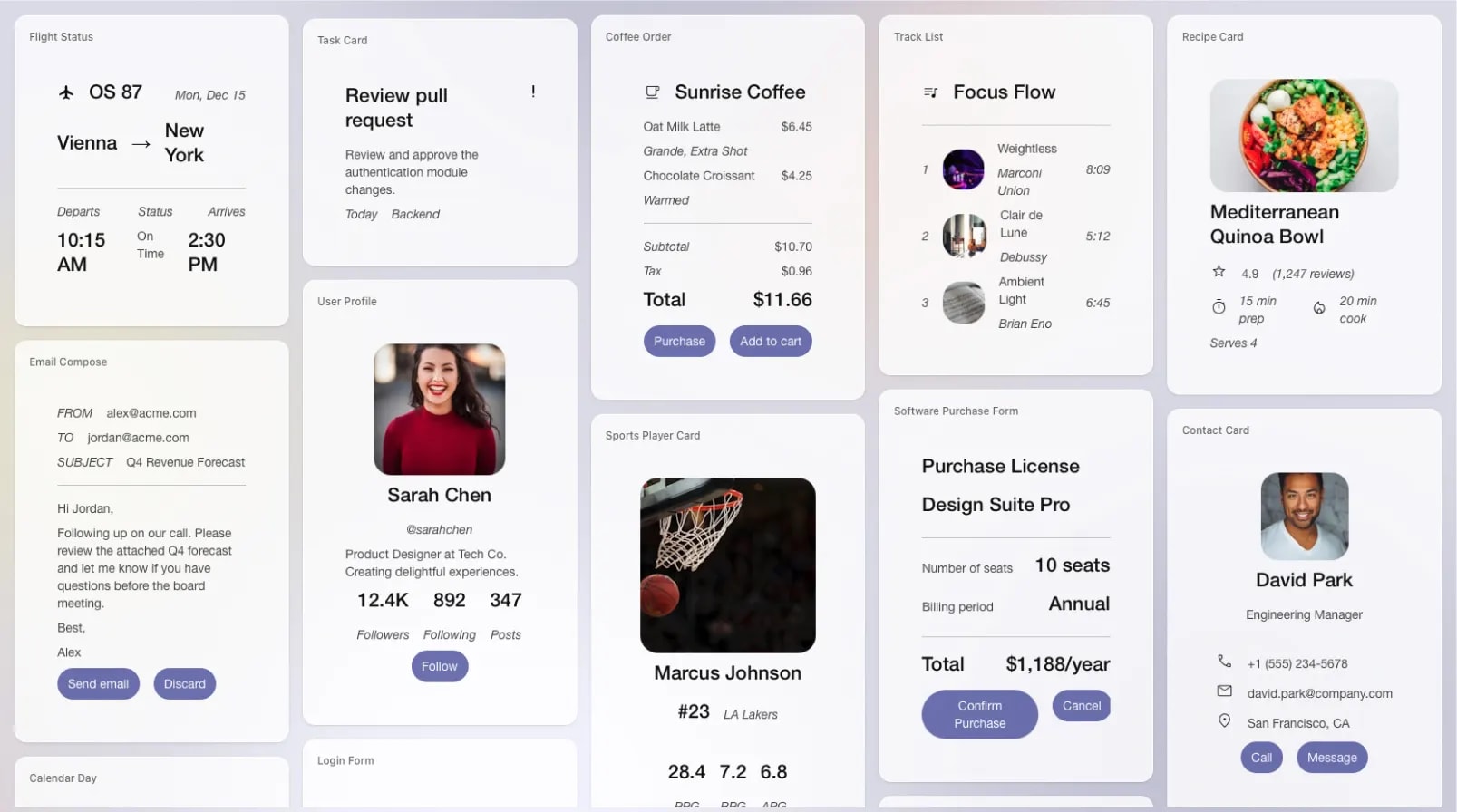
Instead of returning a paragraph of suggestions, an agent can present structured, interactive elements that help users explore options. For example, a travel assistant might surface destination cards with filters and date selectors, or a media assistant might show selectable playlists or content categories that update as preferences become clearer.
Option Selection in Multi-Choice Scenarios
When users must choose among alternatives, structured UI makes decisions clearer than conversational back-and-forth. An agent could present purchasable items, service tiers, or feature bundles as selectable cards with actions like “View details” or “Select”, rather than describing each in long text.
Progressive Clarification
As users provide input, the interface can narrow from broad categories to more specific controls. An assistant helping find a product, venue, or service might first show general categories, then dynamically reveal more detailed filters (price range, features, availability) as the interaction unfolds.
Context-Aware Action Panels
When users are already interacting with an application, the agent can surface relevant actions in a structured panel. For example, while reviewing content or items, the agent might show contextual actions like “Save”, “Compare”, “Add”, or “Proceed”, instead of asking users to type the next step.
Across these examples, the pattern is the same: the agent helps shape an interactive surface that evolves with intent, turning conversational understanding into usable UI rather than leaving structure to interpretation.
Apps SDK: Embedded App Interfaces Inside Agent Hosts
What Is the OpenAI Apps SDK? A Framework for Interactive Agent Apps
OpenAI Apps SDK enables developers to build interactive app experiences that run inside an agent host environment. Instead of the agent describing UI elements directly, developers create UI surfaces, often widget-style components, that integrate with the agent’s reasoning and tools.
In this model, the interface behaves more like a mini application embedded within the conversation, allowing structured interactions to live alongside dialogue.
How the Apps SDK Model Works: Embedded UI + Agent Tools
The Apps SDK model separates responsibilities between the agent, the app logic, and the UI surface:
- The agent handles conversation flow and reasoning
- Tools or services perform actions or retrieve data
- A sandboxed UI component renders interactive controls
- The user interacts with this UI, and events flow back through the agent/tools layer
Unlike declarative UI protocols, the interface here is not generated dynamically by the agent. Instead, it is defined by the app, with the agent orchestrating when and how it appears.
Key aspects include:
- UI runs as an embedded surface, not native host components
- Tight coupling between agent tools and app logic
- Security boundaries rely on sandboxing and integration controls
- Interaction flows can be highly guided and structured
Why This Pattern Exists: Rich Interaction Inside Agent Environments
The Apps SDK approach addresses a different need than A2UI. It’s designed for cases where:
- the interaction resembles an application workflow
- multiple steps must be handled within a controlled UI surface
- the experience benefits from tighter integration between logic and UI
Rather than focusing on cross-platform UI rendering, this pattern focuses on delivering rich, guided interaction inside a specific host environment.
Strengths and Tradeoffs of the Embedded App Model
The embedded app model offers deep interaction capabilities but introduces different architectural considerations compared to declarative UI approaches.
| Impact | What It Means in Practice |
|---|---|
| ✅ Rich, guided workflows | Complex multi-step tasks can live inside a structured UI surface |
| ✅ Tight tool integration | UI actions connect directly to agent tools and services |
| ✅ Familiar app-style UX | Interaction feels closer to a traditional application |
| ⚠️ Host-environment dependent | UI is designed for a specific agent host surface |
| ⚠️ Less portable | The interaction model does not automatically translate across platforms |
| ⚠️ Higher dev effort per experience | UI surfaces must be designed and maintained like app components |
Practical Examples: When Embedded App Interaction Makes Sense
This pattern is particularly effective where interaction resembles a task-focused mini application.
Booking and Reservation Flows
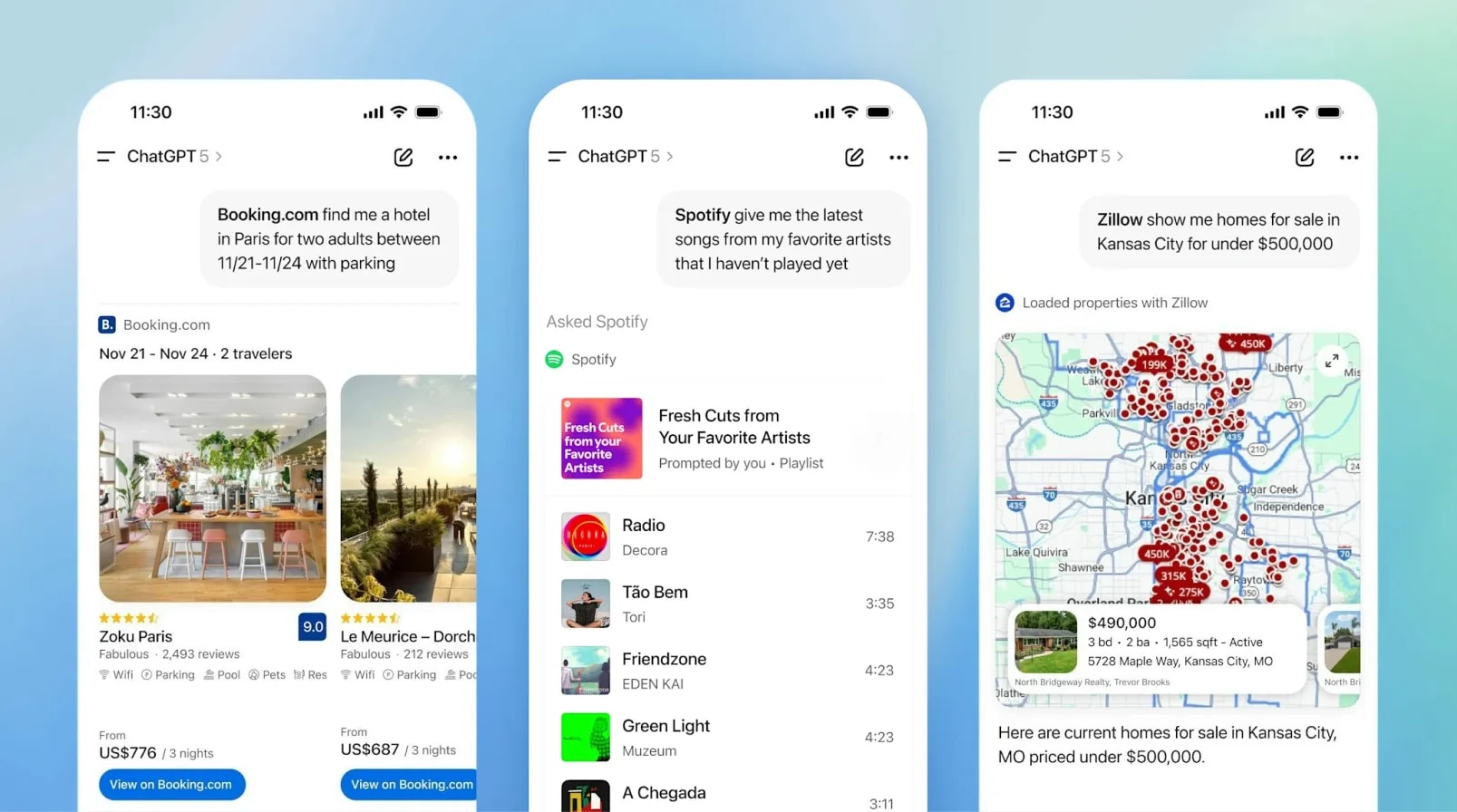
An agent assisting with travel or services can present a structured booking widget, showing options, availability, and confirmation controls instead of long conversational back-and-forth. This allows users to browse, compare, and confirm selections within a guided interface rather than through repeated text prompts.
Media and Content Exploration
For music, video, or content discovery, an agent can surface interactive lists, previews, and selection controls within the conversation environment. Users can scroll, preview, and choose items through embedded UI elements, while the agent continues to provide contextual recommendations or explanations.
Location and Map-Based Tasks
In scenarios involving physical locations, an embedded map interface can appear to help users visually explore results and refine choices. Rather than describing locations purely in text, the UI enables spatial interaction — panning, selecting, and filtering directly within the agent surface.
Multi-Step Guided Processes
For tasks that follow a defined sequence, the embedded UI can guide users step-by-step while the agent handles reasoning and validation behind the scenes. This pattern appears in experiences like design editing or collaboration flows, learning modules with structured lesson progression, or other tool-based tasks where users move through a series of focused actions within a guided interface rather than an open-ended conversation.
Across these examples, the pattern supports app-like interaction within an agent environment, prioritizing rich guided experiences over UI portability.
Interaction Contracts: Governed UI for AI Agents
What Are Interaction Contracts? A Structured Model for Agent–UI Interaction
Not every agent interaction needs to dynamically generate UI or run as an embedded mini-application. In many systems, the priority is that interaction remains predictable, structured, and enforceable.
An interaction contract defines how an agent is allowed to present information and request input, using:
- structured response formats
- strict sections (summary, options, risks, next actions)
- JSON schemas for UI cards or forms
- templated rendering formats
- explicitly allowed action sets
Rather than shaping the interface freely on each turn, the agent operates within a defined interaction framework that separates flexible reasoning from controlled user-facing interaction.
How Interaction Contracts Work: Low-Code, Guardrails, and Reusable Models
In this pattern, the system defines interaction structures ahead of time, and the agent must conform to them.
A typical flow looks like:
- The agent performs reasoning and gathers context
- The system selects an appropriate interaction template
- The agent fills structured fields within that template
- The UI renders the response using predefined formats
- User actions are limited to approved, explicit controls
Platforms like Rierino support this model by making these interaction structures configurable rather than hard-coded. Rierino enables:
- Low-code templates for response shapes (cards, forms, structured sections)
- UI guardrails that constrain output formats and available actions
- Reusable interaction models across channels and modules (Core, Commerce, PIM)
This allows teams to define and evolve interaction contracts without rebuilding custom UI layers for each agent workflow.
Why Interaction Contracts Matter: Reliability, Governance, and Scale
As agents move into operational systems, interaction design becomes part of system reliability. Teams need:
- predictable rendering across similar tasks
- auditability (what was shown, what was confirmed)
- consistent UX across channels
- interaction models that can be reused across use cases
In these contexts, interaction is less about dynamic UI exploration and more about safe, repeatable system behavior.
Strengths and Tradeoffs of the Interaction Contract Model
Interaction contracts prioritize control, reuse, and governance, which makes them powerful in operational environments but intentionally less flexible than UI-generative approaches.
| Impact | What It Means in Practice |
|---|---|
| ✅ Predictable interaction | Users see consistent formats across similar tasks |
| ✅ Strong governance | Outputs and actions are clearly bounded |
| ✅ Reusable patterns | Same templates work across multiple use cases |
| ⚠️ Less dynamic UI | Interaction flexibility is intentionally limited |
| ⚠️ Requires upfront design | Templates and schemas must be defined ahead of time |
| ⚠️ Less exploratory | Experiences favor structure over adaptive UI flows |
Practical Examples: When Interaction Contracts Are the Right Fit
This pattern is strongest where interaction must be repeatable, governed, and aligned with operational systems.
Structured Reviews and Approval Decisions
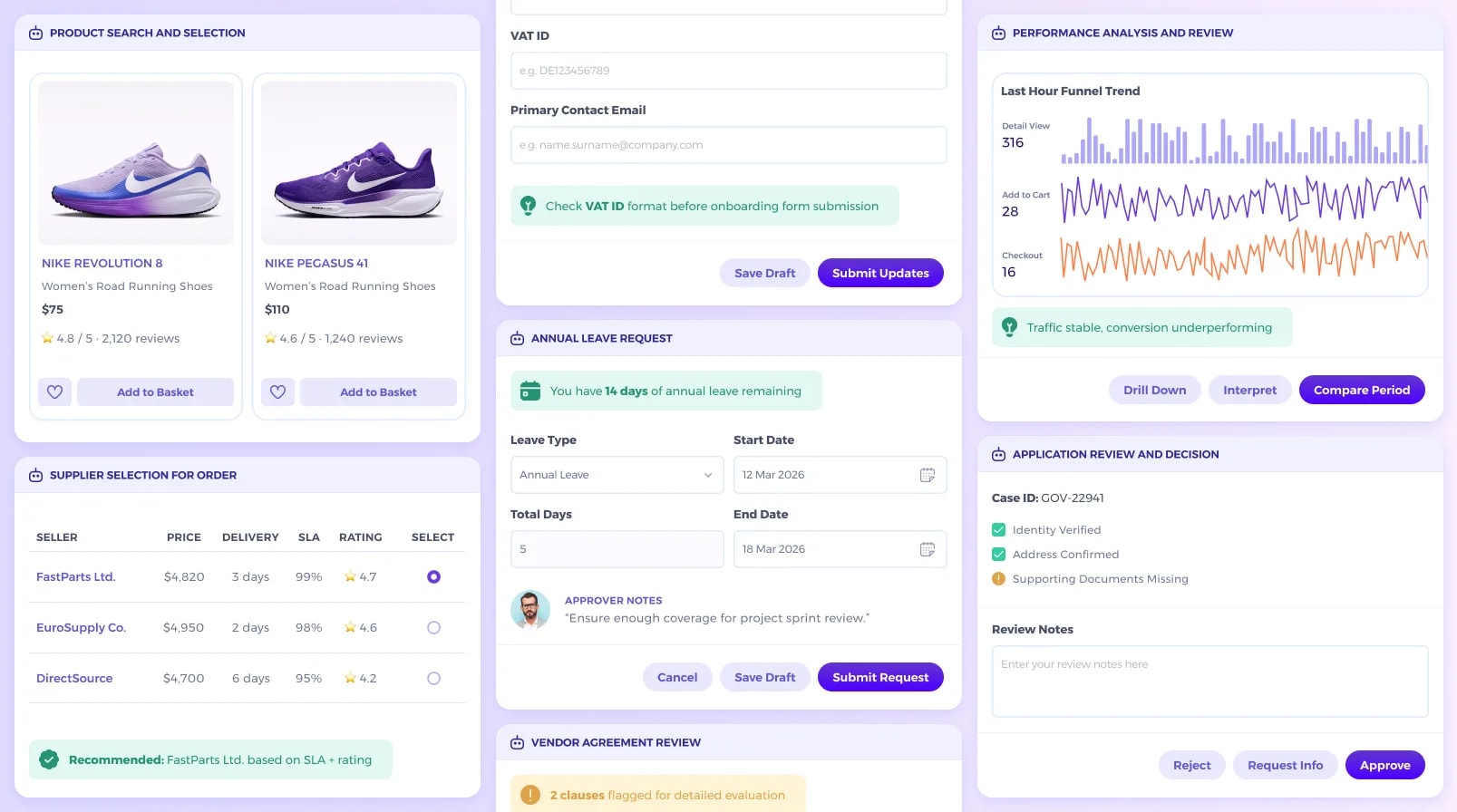
When agents assist with decisions that require accountability, auditability, or policy alignment, interactions benefit from predefined response formats and action sets. For example, a caseworker reviewing a citizen application can see a structured summary of verified data and missing documents, add review notes in a defined field, and choose from actions like “Approve”, “Request Info”, or “Reject”. Similarly, a legal or compliance reviewer might see flagged contract clauses within a templated review card and select from controlled outcomes rather than typing free-form instructions.
Data Capture and Validated Intake
In workflows where user input feeds directly into backend systems, agents can guide data entry while respecting required field structures. An employee leave request may show remaining leave balance, collect dates in standardized fields, and route submission through an approval flow. Partner onboarding can present company details, VAT ID fields, and compliance check indicators in a structured form, where the agent provides checks or tips, but the layout and validation rules remain fixed.
Option Comparison Within Operational Constraints
When users choose between alternatives governed by business rules, interaction contracts provide a consistent selection model. A procurement agent might present supplier options in a structured table with price, delivery time, SLA, and rating, allowing the user to choose from approved options. Similarly, product selection can be handled through standardized product cards with defined attributes and actions, ensuring consistent behavior across comparable scenarios.
Operational Summaries with Guided System Actions
Agents often synthesize system data into structured overviews that lead to clear, bounded next steps. A performance dashboard may display metrics in a fixed layout, while the agent adds a short insight, such as a conversion trend or funnel imbalance. Actions like “Drill Down”, “Interpret”, or “Compare Period” remain predefined, ensuring that interpretation and execution are separated but connected.
Across these examples, the pattern supports governed interaction where agents contribute intelligence within stable UI templates, turning system-aligned processes into reusable, reliable interaction surfaces rather than generating new interfaces each time.
Designing UI-Interactive Agent Systems: An Implementation Guide
Step 1: Identify Your Interaction Type Before Choosing a Pattern
Not every agent interaction needs the same UI model. Start by classifying the interaction intent, not the technology. Ask whether the agent is mainly supporting:
- adaptive exploration (e.g., helping users discover or refine options),
- enabling task-focused workflows (e.g., guided multi-step actions inside a defined surface), or
- producing structured, repeatable outputs tied to system state (e.g., summaries, approvals, validated data capture).
Choosing the wrong interaction model often leads to unnecessary complexity or unclear user experiences.
Step 2: Define the Interaction Boundary Between Agent and System
Before designing UI, define what the agent is allowed to control. Clarify:
- Can the agent shape UI dynamically, or only fill structured fields (free-form vs template-based)?
- Are actions merely suggested, or actually executed (recommendation vs transaction)?
- What must be explicitly confirmed by users (approval steps, irreversible changes)?
This prevents conversational output from appearing authoritative when it does not reflect the real system state.
Step 3: Standardize Response Shapes Early
Regardless of pattern, interaction reliability improves when output shapes are consistent. Even exploratory agents benefit from:
- structured option lists (instead of paragraphs of alternatives)
- clearly separated summaries and actions (context vs next step)
- explicit “next step” controls (select, confirm, proceed)
Structured outputs reduce ambiguity and make UI rendering, logging, and reuse easier.
Step 4: Design for Incremental Interaction, Not One-Shot Responses
Many agent interactions unfold over time. Plan for:
- progressive disclosure (show high-level options first, then details)
- UI updates as context evolves (filters, additional fields, new actions)
- follow-up controls instead of long static responses
This aligns the interface with how users actually explore, decide, and refine intent.
Step 5: Treat Interaction as a Governance Layer, Not Just UX
As agents become system components, UI interaction becomes part of operational safety. Interaction design should make it clear:
- what the user saw (visible options and data)
- what they confirmed (decisions, inputs)
- what changed in the system (state updates, triggered actions)
This is where interaction design intersects with orchestration, traceability, and compliance.
Step 6: Start Small with Reusable Interaction Patterns
Instead of designing every agent interaction from scratch:
- identify a small set of common interaction types (selection, approval, summary, intake)
- define reusable templates or UI models
- expand gradually as usage grows
Reusable interaction patterns reduce complexity and make it easier to scale agent capabilities across systems.
The Agent↔UI Interaction Layer Becomes a Platform Capability
AI agent discussions often focus on models, prompts, and reasoning. But as agents move into real systems, another layer is becoming just as important: how agents interact with users through structured, reliable interfaces. Across the patterns we explored, including declarative UI protocols, embedded app experiences, and interaction contracts, a common direction is emerging.
First, interaction models are moving toward standardization. Whether through UI description formats, component catalogs, or structured response schemas, teams are looking for ways to make agent interaction more consistent and interoperable rather than reinventing it per use case.
Second, UI interaction is becoming part of governance, not just UX. When agents influence decisions, collect information, or trigger actions, the interface becomes part of how systems ensure traceability, confirmation, and safe execution.
Third, differentiation will come from reliable interaction patterns, not just model access. As models become more accessible, what separates systems is how well they translate agent reasoning into usable, trustworthy interaction, whether through adaptive UI, embedded workflows, or governed templates.
The next phase of agent systems will not be defined only by smarter models, but by platforms that treat interaction as a first-class architectural capability.
Ready to design scalable, production-ready agent interactions? Get in touch to explore how AI agents can power usable, trustworthy experiences across your systems.